
Run it · 12 of 18
Scheduled reports
Scheduled reports in inbuxa: a summary of mail flow, spoofing, deliverability, security, storage and certificates, built from what the server already keeps and mailed on a schedule. The weekly digest is built in.
On this page
A report the server builds on a schedule from what it already keeps, and mails to accounts on this server: a short summary in the body, and the detail as CSV files if you want them. Nothing new is collected to make one.
Reports are under Management › Reports › Scheduled.
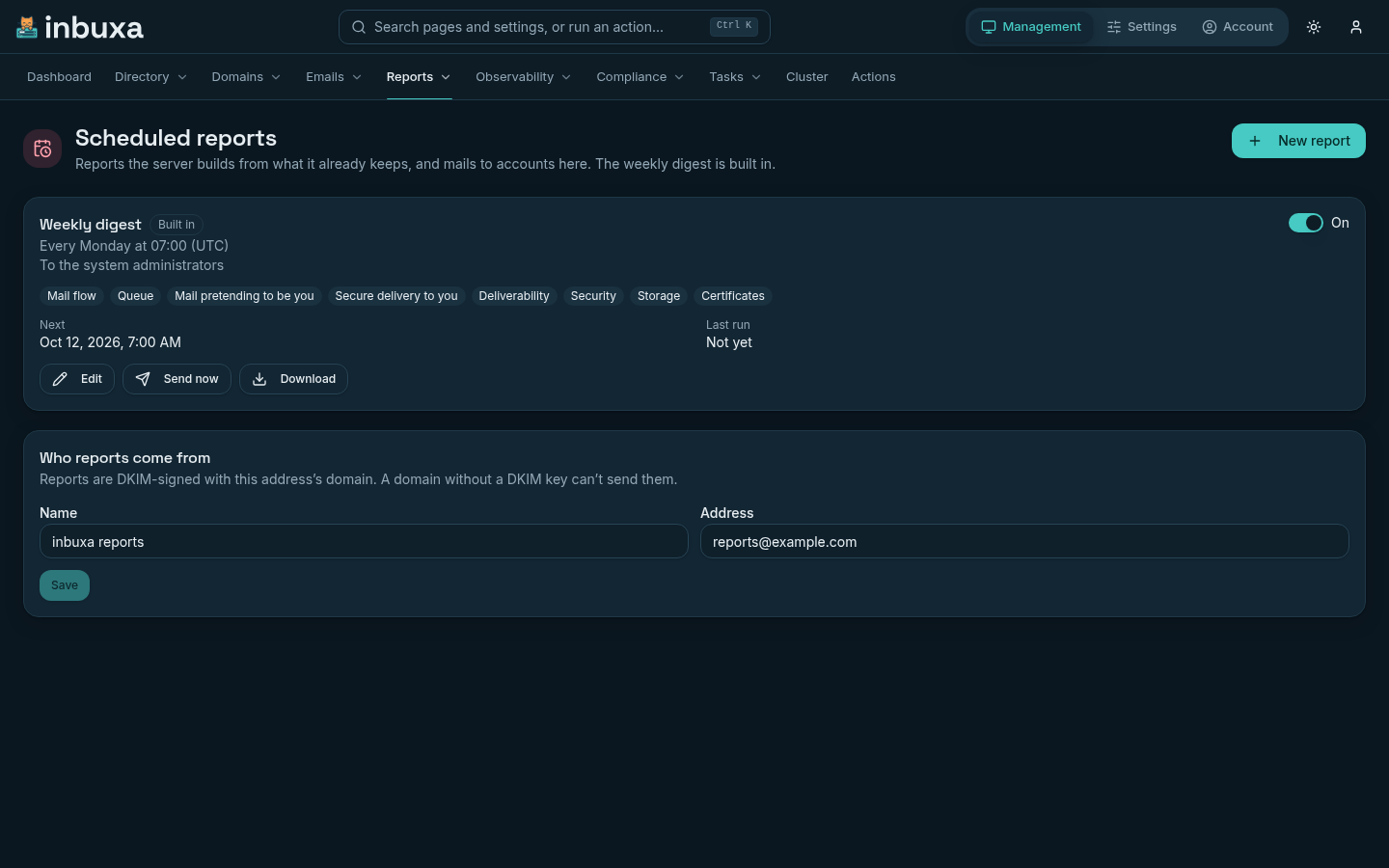
The weekly digest
Every server has one report from the start: the Weekly digest. It covers every section below, goes every Monday at 07:00 UTC to the system administrators, and attaches no CSV files. It's how someone who never opens the console still hears about mail pretending to be from your domains, a blocklisting or a full mailbox.
- Who gets it is every account with the administrator role that doesn't belong to a tenant. The list follows the directory, so an administrator added or removed is added or removed here too, and it can't be edited by hand.
- When it goes, what it covers and the CSV files can be changed like any other report's.
- It can be turned off with its switch, but not deleted.
Its first run is the first Monday 07:00 after the server was upgraded to a release with scheduled reports, and it covers the week before.
A report
New report opens the editor. A report has:
- Name: it starts the mail's subject, as in "Weekly digest: Sep 28 – Oct 5, 2026" for the run due on Monday, October 5.
- What it covers: one or more of the sections.
- When: Every day, Every week on a weekday, or Every month on a day from 1 to 28, at a time, in a time zone. The editor offers your own time zone. A time a clock change skips goes at the first moment after it; a time that happens twice goes the first time.
- Who gets it: one address per line, up to 50. Each must be an account on this server, so a report never leaves it.
- Attach CSV files: the detail behind each section, one file per section that has rows, for a spreadsheet.
Each run covers the day, week or month up to the moment it's due. A section with nothing in it is left out, and a period with nothing to say in any section still sends one line, "Nothing to report for this period.", so silence never means a report that stopped.
The sections
Where a section has numbers, each is shown against the period before of the same length.
| Section | What it says |
|---|---|
| Mail flow | Messages received, sent by your people, delivered as spam and bounced, and the average delivery time. Counted across every node of a cluster. |
| Queue | Messages still waiting to be delivered at the end of the period, when there are any. |
| Mail pretending to be you | From the DMARC reports other servers sent: for each of your domains, messages that used it and couldn't prove it, which sources sent the most, and what the receivers did with them. Only domains with failures appear. |
| Secure delivery to you | From the TLS reports other servers sent: for each of your domains, deliveries that couldn't be encrypted, by reason. |
| Deliverability | What the deliverability check finds failing now, and what started or stopped failing since the report's last run. |
| Security | Failed sign-ins, addresses banned (and why: sign-in, abuse, scanning or loitering), and connections from blocked addresses. |
| Storage | People at 90% or more of their storage, fullest first, with their address, use and limit. On the server's own reports, also how many people and domains there are now, when that changed. |
| Certificates | Certificates that have expired or expire within 21 days. |
The editor says what each section contains before you add it.
What needs attention
The mail opens with Needs your attention when any section has something to act on: a domain being spoofed, deliveries to you that couldn't be encrypted, a deliverability finding that's new since the last run, people nearly out of storage, or a certificate about to expire. Each section follows with its detail.
Deliverability
Each node checks what the internet sees of it, daily: its addresses on blocklists, reverse DNS, SPF, DKIM, MTA-STS and certificates. The report counts as failing an address or domain on a blocklist, an address with no reverse DNS or one that doesn't point back, SPF that doesn't let a sending address send, a DKIM key missing from DNS or different from the one signing, an MTA-STS policy that's published but can't be fetched, and a certificate that doesn't cover the name it's used for.
Each run keeps what was failing, so the next one marks every finding New or Still, and lists what was Fixed since. Only new findings reach Needs your attention. The full check, with a grade for every finding, is under Management › Domains › Deliverability.
The mail
- Subject: the report's name and the period it covers.
- Body: plain text and HTML, one column, readable without images. When
the server's
INBUXA_ADMIN_URLis set (see The console), each section links to its page in the console. - From: set under Who reports come from at the top of the page. It
starts as "inbuxa reports" at
postmaster@the server's default domain. Bounces come back to that address. - Signed: with the DKIM key of the From address's domain. A report is never sent unsigned, so a domain without a DKIM key can't send reports (see DNS, DKIM and certificates).
- Marked
Auto-Submitted: auto-generated, so out-of-office replies and other automatic answers leave it alone.
Before the first digest goes out, check Who reports come from is an
address on a domain you send from. A server whose default domain is a
placeholder, such as localhost.local, can't sign with it.
Running them
Every node looks once a minute for reports that are due, and the first to claim one sends it, so a report goes once on a cluster however many nodes there are. A server that was down when a report was due sends it once when it's back, not once for every run it missed.
Each report shows when it goes Next, and its Last run: when it went and to how many people, marked (sent by hand) if it was. The last 20 runs are kept, with counts and sizes only. A report's contents are built when it's sent and never stored.
- Send now builds the current period and mails it at once.
- Download builds a report for its last full period, the last 7 or 30
days, or dates you pick, up to 90 days back, which is as far as the
server's metrics go (see Monitoring). It's a
ZIP with
summary.txtand a CSV for each section that has rows. Nobody is mailed. - Delete can be undone for a few seconds.
When a run fails
A failed run says why under Last run:
| Reason | What to do |
|---|---|
| domain has no DKIM key to sign with | Give the domain a DKIM key, or change Who reports come from to an address on a domain that has one |
| No recipient is an account on this server | Change Who gets it to addresses of accounts here |
| The mail queue didn't accept the message | Look at Management › Emails › Queued and the server's log |
A failed run isn't retried; the next one goes at its usual time, and Send now tries again at once. When a report's last two scheduled runs both fail, it shows on the dashboard's Needs attention.
Tenants
A tenant administrator sees only their own tenant's reports, and can make reports for their tenant's domains and people. Those reports leave out Mail flow, Queue, Security and Certificates, which are about the whole server, whichever sections were picked. The sections they keep count only the tenant's domains and people.
The weekly digest is the server's, so tenant administrators don't see or get it. Who reports come from is set by the server's administrators only.
Who can do what
| Permission | Allows |
|---|---|
sysScheduledReportGet |
Seeing reports, their runs, and downloading one |
sysScheduledReportUpdate |
Making, changing and deleting reports, and Send now |
Both are granted to the administrator role and to the default tenant administrator roles, including roles made before the upgrade.