
Run it · 17 of 19
Security
How inbuxa keeps web interfaces off the mail host, restricts the server's API to origins you configure, signs in only apps you registered, and lists what in your own settings leaves the server more open than it needs to be.
On this page
The design has one idea in it: the machine that holds the mail does mail, and nothing else.
No web interface on the mail host
A web interface is the part of a mail server most often attacked, and it is the part a mail server needs least.
inbuxa installs none on the mail host and fetches none at first boot.
/admin and /account answer 404, in bootstrap mode and after setup alike.
Administration is inbuxa Admin's job, and the webmail is its own
service; both are deployed separately and can live on another machine
entirely.
An install upgraded from Stalwart keeps what it had
If the server you migrated from had a web application configured, it comes across with everything else — the store is copied as it is. Remove it deliberately if you do not want it.
The API answers only the origins you name
The server's API answers cross-origin requests only from the console and
webmail origins you configure. An unrelated web page in someone's browser
cannot call it, which is the attack that a permissive Access-Control-Allow-Origin
would leave open.
Set those origins when you install, and again if you move a front end to a different hostname.
Only apps you registered can sign anyone in
The console and the webmail sign in with OAuth — authorization code with PKCE — as first-party clients the server registers for itself on first boot.
Client registration is required, from the first boot, which means an application the administrator has not registered cannot start a sign-in at all. A phishing page cannot borrow the real sign-in page to collect credentials, because the server will not issue a code to a client it does not know.
Anything that is not first-party goes through a consent page naming it.
The server decides every permission
Neither front end decides what anyone may do. Both ask, and the server answers, so the two can never disagree — and a tenant administrator sees their own tenant wherever they sign in, by whichever route.
This is also what makes switching protocols off reliable rather than cosmetic.
Getting back in
A settings change can lock the front ends out: a bad listener, a bad certificate, an IP ban that caught you.
The server has a recovery mode for that. Start it with these set in its environment:
| Variable | What it does |
|---|---|
INBUXA_RECOVERY_MODE=1 |
Starts the server with none of its configured listeners, and one plain-HTTP listener for the API instead |
INBUXA_RECOVERY_ADMIN=name:password |
An administrator that works only in this mode |
INBUXA_RECOVERY_MODE_PORT |
That listener's port. 8080 if unset |
Then point the console at that port, sign in as the recovery administrator, fix what's wrong, and restart the server without the variables. No web interface is served by the mail host at any point: the console is still the separate program it always is.
Keep the recovery port private
The recovery listener is plain HTTP and listens on every interface. Reach
it over an SSH tunnel, and don't let it through your firewall. In a
container, publish it to 127.0.0.1 only, as the install uses for its
setup port.
The recovery admin variable
A recovery administrator set by environment variable is honored only in bootstrap and recovery mode, and the server logs a warning if it is set at any other time. Do not leave it set on a running server: take it out of the unit once setup is done, not just out of the running container.
The security to-do list
Settings › Security › Security lists what in the server's settings leaves it more open than it needs to be, most serious first. It's checked each time the page opens. There is no score: an item is either to do, accepted, or passed, and when nothing is to do the page says nothing about it.
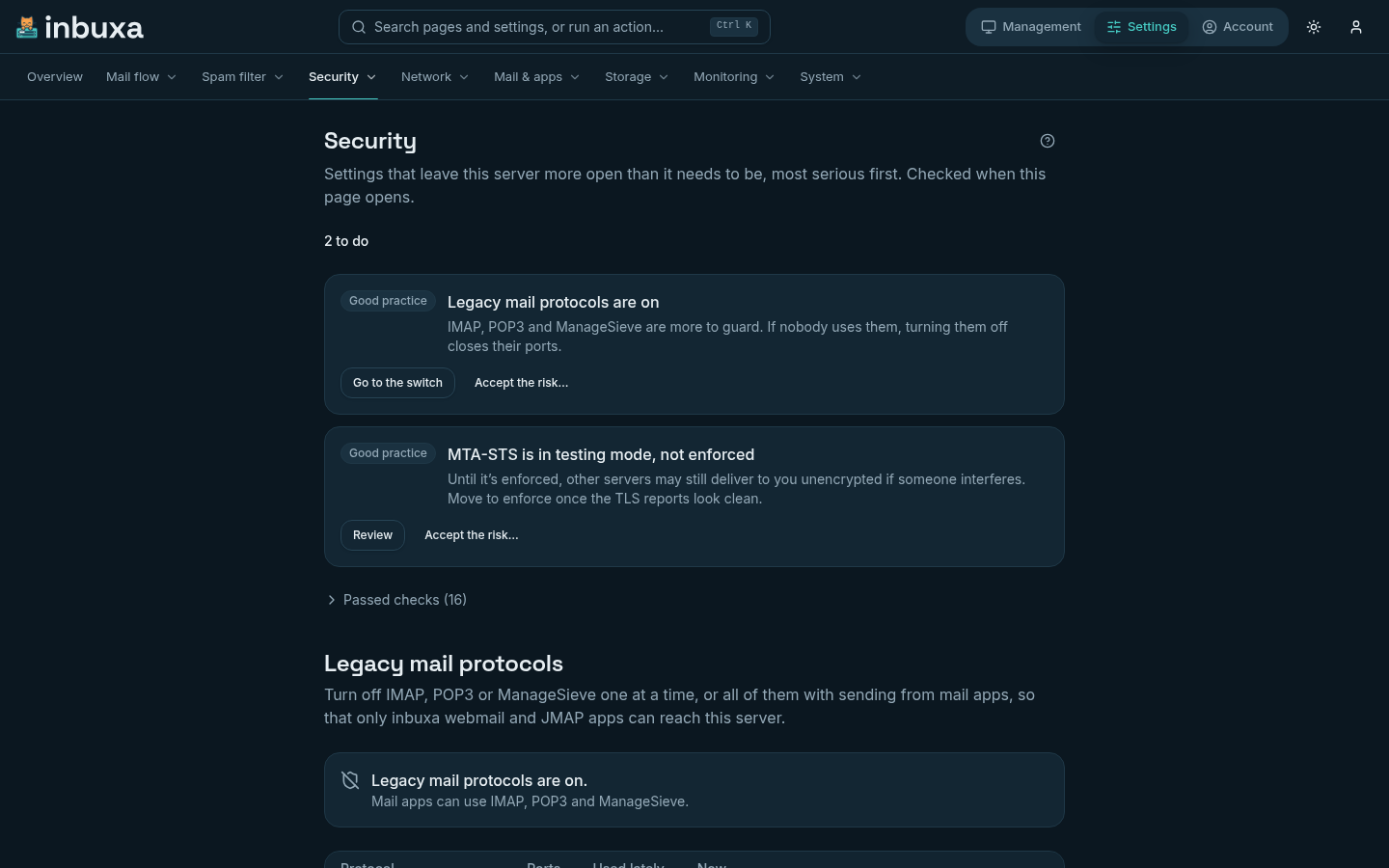
Each item says what's wrong and why it matters, and has one action:
- Fix puts one setting back to its default, and shows the change before you click ("Allow plain text authentication: on → off"). The message after it has Undo.
- Review opens the setting, for anything that shouldn't be changed blindly: an edited rule may be deliberate, and a certificate is renewed, not reset. Where a rule was changed, both versions are shown side by side.
- Go to the switch scrolls to the legacy protocols further down the page, which list who still uses each one before anything closes.
Explain is there too where local AI is set up. The page's ? explains every check.
| Check | Counts as something to do when | Action |
|---|---|---|
| Critical | ||
| Plain-text passwords over IMAP | IMAP accepts a password on an unencrypted connection | Fix |
| The relaying rule | It differs from the default: only people who signed in | Review |
| Domains that relay for anyone | A domain passes mail on without a sign-in | Review |
| Sign-in for sending | The rule differs from the default: everywhere but port 25 | Review |
| Certificates | One has expired, or expires within 7 days | Review |
| Important | ||
| Automatic bans | Any of the failed sign-in, abuse or port-scan bans is off | Fix |
| Rate limits | Requests from people who aren't signed in have no limit | Fix |
| OAuth client registration | Apps may register themselves, or sign in unregistered | Fix |
| Password rules | Minimum strength or length is below the default | Fix |
| Certificate checks on outgoing mail | A TLS strategy accepts invalid certificates | Review |
| DMARC checks on incoming mail | They no longer run on port 25 | Review |
| Metrics | Prometheus metrics are on with no password | Review |
| Mail records in DNS | An enabled domain is missing MX, SPF, DKIM or DMARC in public DNS | Review |
| Certificates | One expires within 30 days | Review |
| Good practice | ||
| Legacy mail protocols | Any of IMAP, POP3 or ManageSieve is on | Go to the switch |
| Password hashing | New passwords are hashed with PBKDF2 rather than Argon2id | Fix |
| MTA-STS | It isn't enforced | Review |
| DMARC policies | A domain's DMARC record says p=none |
Review |
A new install shows two items, legacy protocols and MTA-STS, both on purpose: each is a step to take once you know it's safe for your people.
Raising the password rules or switching to Argon2id doesn't touch existing passwords; they follow the new rules the next time each one changes. A Fix never writes a password or other secret, a DNS record or a listener, and never turns on encryption at rest: those are Review items, or not items at all.
A check that couldn't run, for want of permission or because public DNS couldn't be reached from your browser, isn't a to-do item. It's listed under Passed checks as not checked, with why.
Accepting a risk
Any item can be accepted instead, critical ones included, with a note saying why. The note is required, and every administrator sees it, with who accepted it and when, under Accepted. Put back on the list removes the acceptance.
An acceptance holds only while the setting stays as it was. If it changes, the item comes back, marked as accepted earlier for a different value. Accepting and removing an acceptance are both in the audit log.
Accepting needs the Accept security to-do items permission, which administrators have. The page is for administrators of the whole server: tenant administrators don't see it, since every check is server-wide.
On the dashboard
While a critical item is on the list and not accepted, the console's dashboard leads its Needs attention tiles with it ("1 critical security item"), and the tile opens the page.
What the AI features do and do not send
inbuxa uses a language model in two places, both described on Local AI. Both are off in a new install: there is no model configured, and nothing is sent anywhere until an administrator creates one.
The spam filter can ask the model for an opinion, as one signal among senders, content and reputation. When it is on:
- only the subject and the message text are sent — never the envelope, the addresses, other headers, the client IP, attachments or images;
- message content is never written to the logs;
- a model that is slow or failing is skipped rather than queued, so mail never waits on it.
Explain, in the console, asks the model to put a failure, a verdict, a log line or a setting into plain words. The console never sends free text: it names what to explain, and the server builds the question from stored data and the setting's documentation. Message bodies, subjects, attachment names, passwords and secret settings are never sent. The answer goes back to the administrator who asked, and is kept in memory on that node for up to a day, so another server administrator asking the same question gets it without the model being asked again. It is never written to disk or logged.
A person's own Sieve scripts can also call the model, if their role allows it. What a script sends is up to the script.
No URL, model name, prompt or example anywhere in inbuxa points at a hosted provider. You can point it at one — including a hosted OpenAI-compatible endpoint — and if the address is not on your own network the server warns you at startup and on every change, and the console repeats the warning on the model's form.
That warning is a warning, not a block
The check never refuses an endpoint you chose. If you configure a hosted model, message content goes to it. Nothing is preset to one, and nothing goes anywhere you did not configure.