Local AI
inbuxa can use a language model in two places:
- The spam filter asks it for an opinion of each incoming message. The opinion is one signal among many, and its weight is capped.
- Explain, in the console, asks it to put a delivery failure, a spam verdict, a log line or a setting into plain words, for an administrator.
Both are off on a new install, and nothing is sent anywhere until you set a model up. The model is one you run, on the mail server or on your own network. Nothing in inbuxa points at a hosted service, and the console warns you if the address you give isn't on your own network.
What each use sends to the model, and what it never sends, is on the Security page.
Running a model
Anything that serves an OpenAI-style chat completions API works. The two tested are llama.cpp's server and Ollama. The console suggests their usual addresses:
| Server | Address |
|---|---|
| llama.cpp | http://127.0.0.1:8080/v1/chat/completions |
| Ollama | http://127.0.0.1:11434/v1/chat/completions |
The recommended model is Qwen3 4B Instruct 2507 (Apache-2.0), quantized to Q4_K_M, which is about 2.5 GB on disk and takes about 4 GB of memory running. No GPU is needed. What it costs in time, measured on CPU cores:
| Cores for the model | Typical message | Slowest 1 in 20 |
|---|---|---|
| 4 | 6.3 s | 11.0 s |
| 2 | 10.8 s | 20.4 s |
These are the numbers for the smallest setup that works well: a 4B model on a few CPU cores, with no GPU. Treat them as a floor, not a forecast. More or faster cores bring them down, and a GPU brings them down a long way, so measure on your own hardware. On a small virtual server with slower cores, expect them to be higher. Four cores is the recommended minimum. On two, about one message in twelve runs past the 20-second limit and goes unclassified, which is safe but loses the signal. The default limits below are set for a small CPU-only machine.
The model's time is spent while the message is already being received, and never holds it up. What it costs is CPU: give the model its own cores, or it competes with the mail server for them. See Sizing.
Keep the model on the same machine
Point the address at loopback. Message text then never leaves the mail server. The model's port only has to answer the mail server, so bind it to loopback too.
On a cluster
The setting is one for the whole cluster, and so is the model's address:
there's no per-node address. Loopback is what makes that work. With
127.0.0.1, each node asks the model on its own machine, so run one model on
every node.
A node with no model, or whose model is down, just adds no AI signal. Its mail is filtered and delivered as normal. So does a message that arrives when Requests in flight at once are all taken: it isn't queued for the model, it's scored without it. The limits on calls in flight and the pause after failures are counted per node, so a cluster of three nodes can have three times Requests in flight at once running.
Turning it on
In the console, go to Settings › Spam filter › Local AI. It says Off and "The spam filter doesn't use a language model. Nothing is sent anywhere until you set one up."
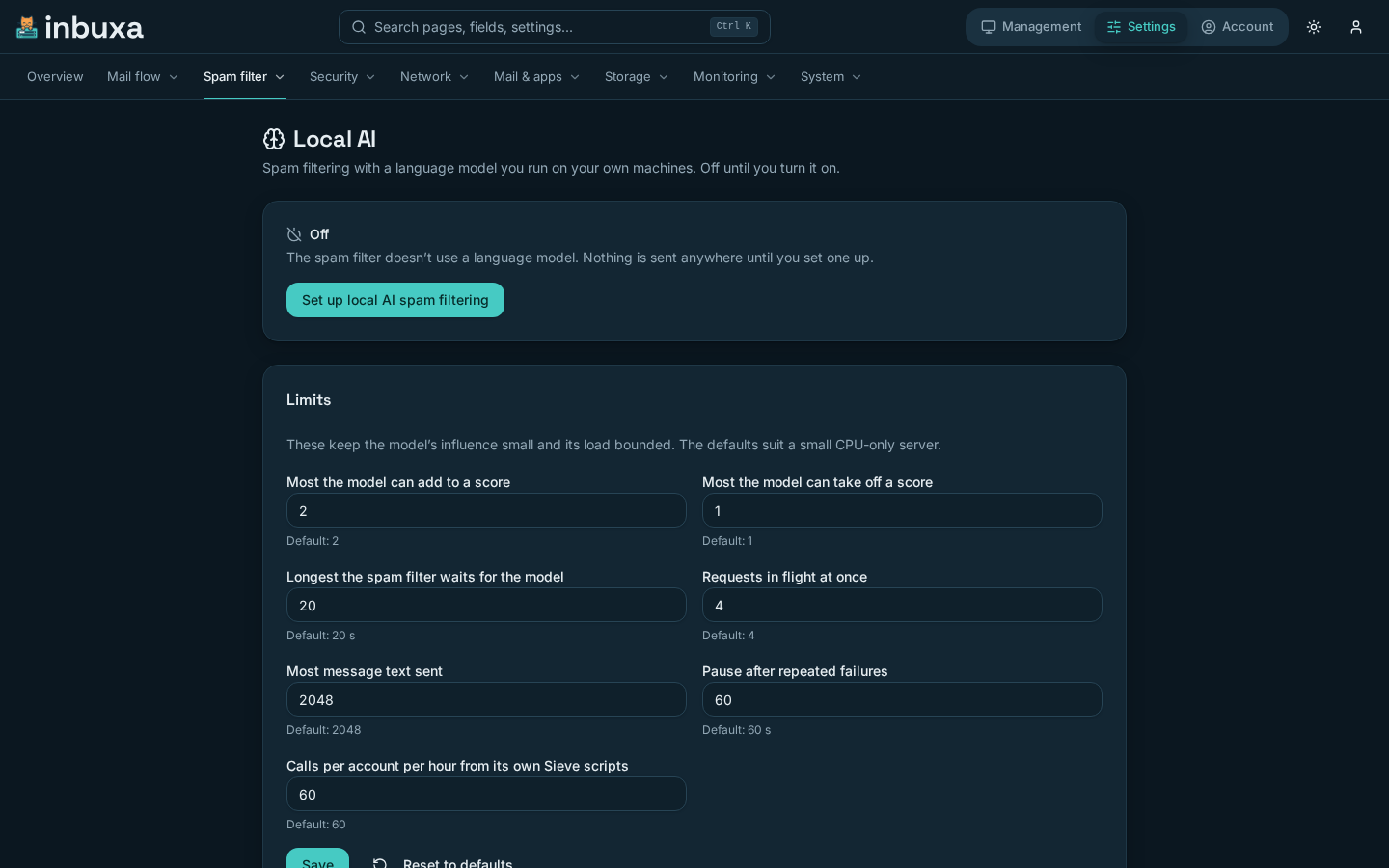
- Choose Set up local AI spam filtering, then Guided.
- Step 1 says what will happen: only a message's subject and text are sent, with no addresses, headers or attachments. The opinion adds at most 2 points by default. A slow or missing model never holds mail up.
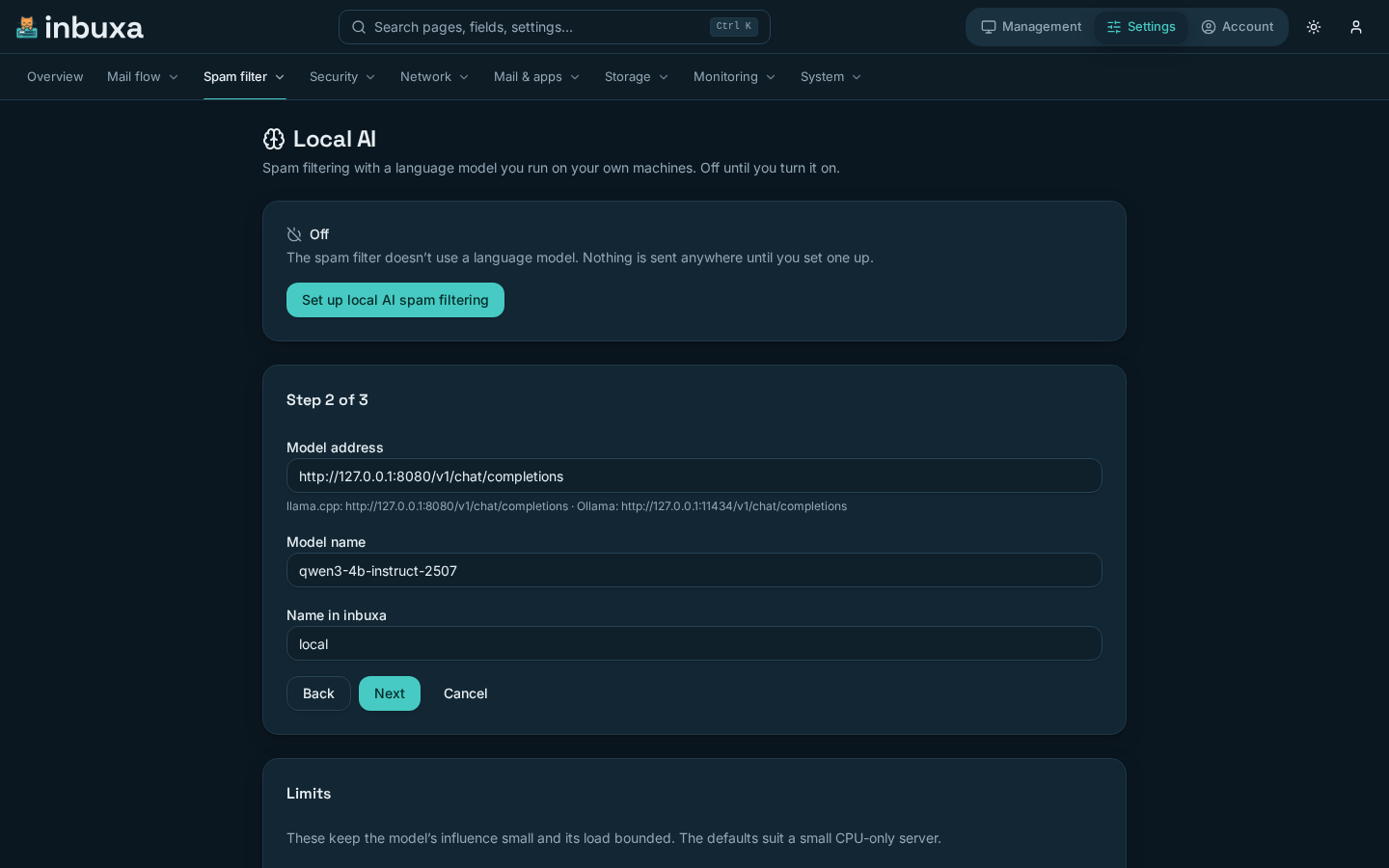
- Step 2 asks for the Model address, the Model name the server knows it by, and a Name in inbuxa. An address that isn't loopback or a private network gets a warning, not a refusal.
- Step 3 shows the Instructions for the model. The default was measured against real mail; change it only with a reason. The server adds its own framing around it, so a message is treated as data, never as instructions.
- Choose Turn on.
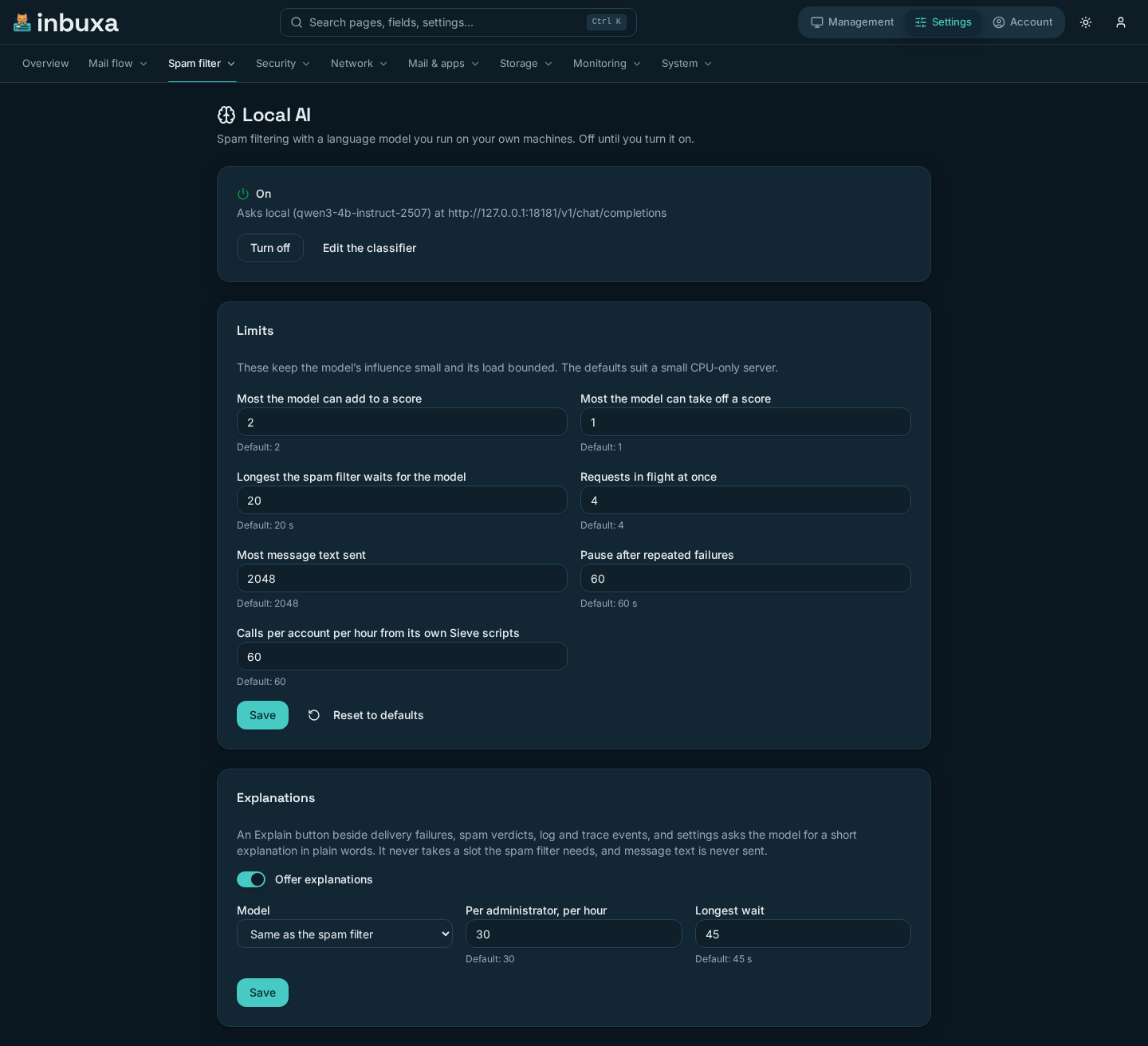
The page then says On, and which model it asks at which address.
Running the setup again reuses a model with the same name rather than making a second one.
Without the guide
Manual goes to the two forms the guide fills in:
- Settings › System › AI models: the model, with its address, name and timeout.
- Settings › Spam filter › LLM classifier: the classifier, which is Disabled until set to Enabled with a model and a prompt. The categories and confidence levels it accepts are set here too.
Turning it off
Turn off on the Local AI page switches the classifier off. The model stays configured, so turning it back on is one step. Explain keeps working while a model exists; see below.
If you stop the model instead, and leave the classifier on, every message fails the model call quickly and is filtered without it. Turning the classifier off stops it trying.
Limits
The Limits card on the Local AI page keeps the model's influence small and its load bounded. Changes take effect with the next message. A value equal to the default is stored as "use the default", so it follows the default if that changes in a later release.
| Limit | Default | What it does |
|---|---|---|
| Most the model can add to a score | 2 points | The cap on the model's word alone |
| Most the model can take off a score | 1 point | The cap on the model vouching for a message |
| Longest the spam filter waits for the model | 20 s | After that, the message is filtered without it |
| Requests in flight at once | 4 | Per node, shared by the spam filter and Explain. Explain only takes one while at least one stays free for mail |
| Most message text sent | 2048 bytes | More measured no better, and made small machines slow |
| Pause after repeated failures | 60 s | A dead model stops being asked for a while |
| Calls per account per hour from its own Sieve scripts | 60 | See Sieve |
Reset to defaults puts all of them back.
The limits are a server-level setting. A tenant administrator can't see or change them.
What people see
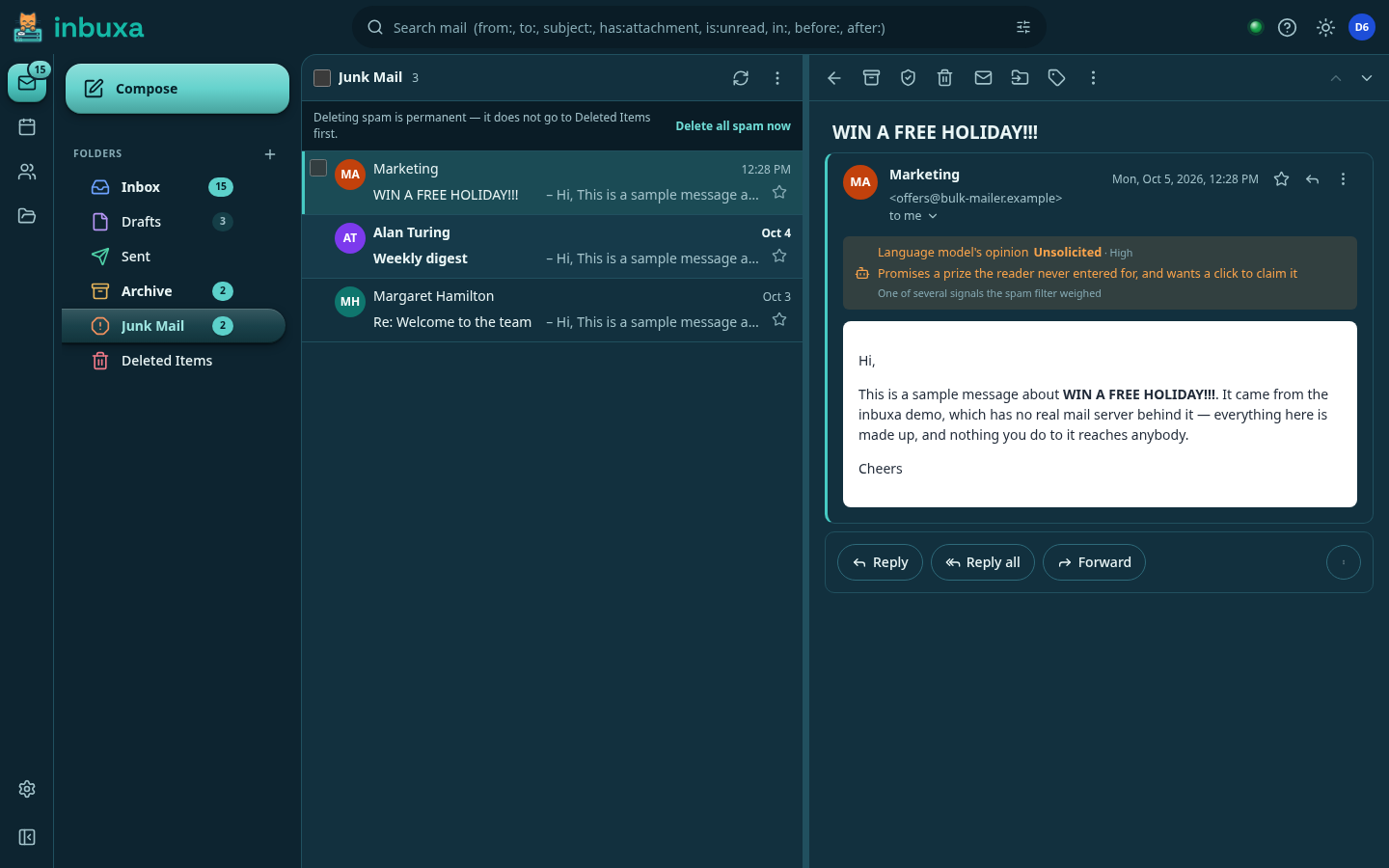
When the model gave an opinion, the webmail shows it:
- in a message's details, beside the spam filter's own working;
- in a banner above a message that is in Junk, headed Language model's opinion.
Both show the model's category and confidence, and its short reason, and say "One of several signals the spam filter weighed". The reason is the model's own words, shown as plain text. There's no setting for it: people see it when the model gave one.
The opinion comes from the message's X-Spam-LLM header, which the server
adds when the model's answer produced a tag, such as LLM_UNSOLICITED_HIGH.
Those tags are scored like any other spam tag, under Settings › Spam
filter › Scores.
Explain
Explain puts something in the console into plain words. It appears:
- beside each recipient of a queued message that failed, temporarily or permanently;
- under the result of classifying a message;
- in each row of Logs, and beside each event of a trace, stored or live;
- beside a field's help, for any setting that isn't a secret.
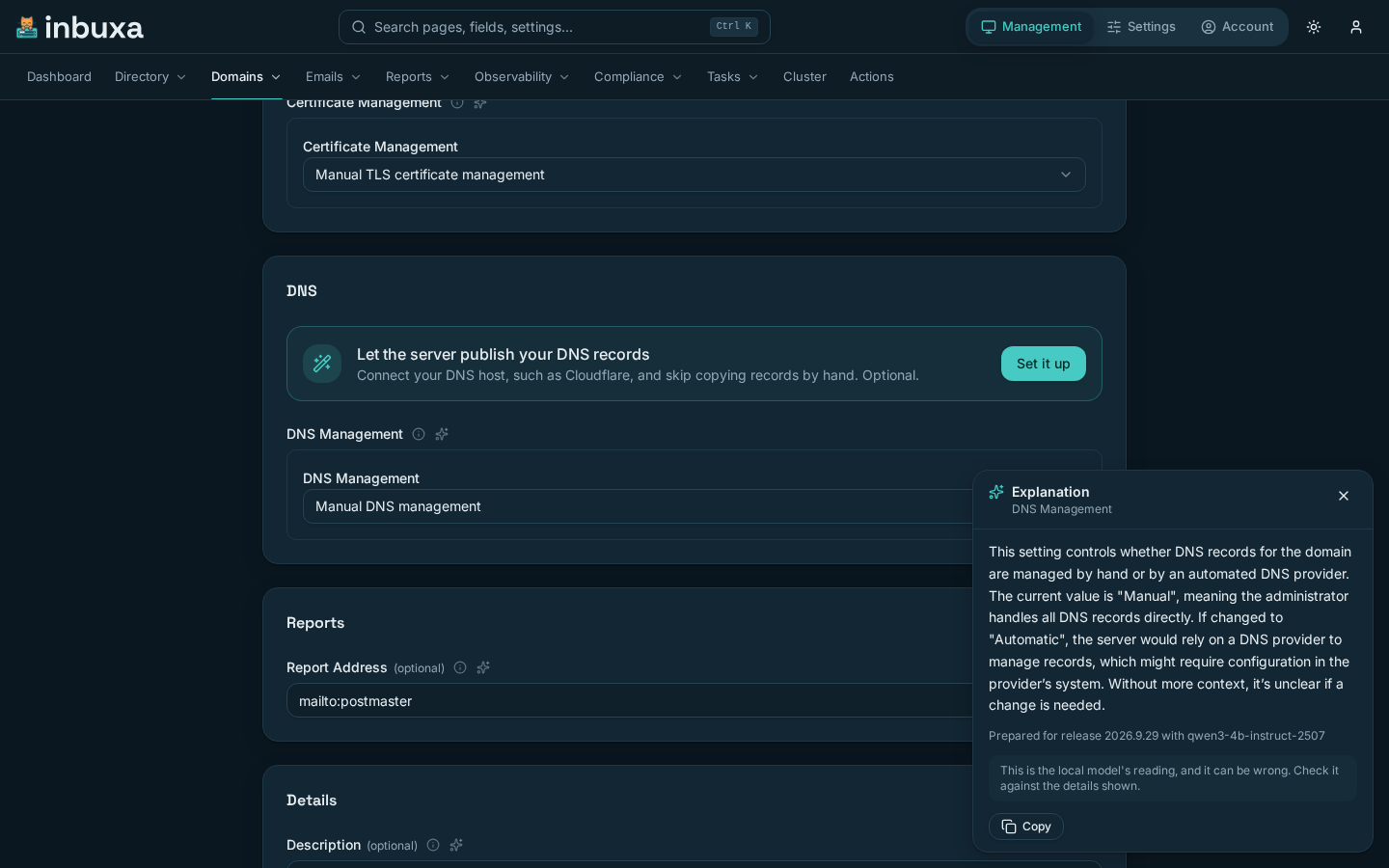
The answer opens in a side panel and appears as the model writes it, so the first words show within a few seconds. Answers are kept short: three or four sentences. It is the model's reading, and it can be wrong. Check it against the data it explains.
Not every answer needs the model:
- Asked before. Each node remembers the answers it gave, in memory, for up to 24 hours: up to 1,000 of them. The same question, from any server administrator, is answered at once without asking the model again. Remembered answers are never written to disk, and a restart forgets them.
- Prepared with the release. Each release ships explanations of the settings at their default values, written beforehand with the recommended model. A setting you haven't changed is explained at once. Once you change it, or a release changes its description, the model is asked instead.
The line under the answer says which: the model and node that answered just now, an answer given earlier on that node, or the release it was prepared for.
The console never sends text you type. It names what to explain, and the server builds the question from the stored data and the setting's documentation. Message bodies, subjects, attachment names, passwords and secrets are never part of it, and a secret setting can't be explained at all.
Who can use it
Explain needs the permission Ask the local model to explain things in the
console (sysAiExplain). Only the superuser role has it by default. A
tenant administrator is refused even with it.
It shows only when a model exists. That can be a model with the spam classifier off: Explain doesn't need the classifier.
Its settings
The Explanations card on the Local AI page:
| Setting | Default | What it does |
|---|---|---|
| Offer explanations | on | Off hides Explain everywhere |
| Model | Same as the spam filter | Or a different model under Settings › System › AI models |
| Per administrator, per hour | 30 | Explanations each administrator can ask for |
| Longest wait | 45 s | After that, the panel says so |
Mail comes first: an explanation only takes a request slot while at least one stays free for the spam filter. When the model is busy with incoming mail, paused after failures, or missing, the panel says which.
Sieve
A filter can ask the model a question itself, with
llm_prompt(model, prompt, temperature). It returns the model's answer for
the script to test.
A person's own scripts can call it only with the permission Interact with
AI models (interactAi). The default user, tenant administrator and
superuser roles have it. Calls are limited by Calls per account per hour
from its own Sieve scripts. Whatever a script sends is what the model
sees, so a script that sends message text sends it to your model.