Clustering
One server is enough for most installs. A cluster is for when you want mail
to keep flowing while a machine is down, or more capacity than one machine
has. Every node runs the same inbuxa-server, with the same settings, and
they share one store.
What a cluster needs
- A data store every node can reach. PostgreSQL, MySQL or FoundationDB, set under Settings › Storage › Data store. RocksDB and SQLite are files on one machine's disk, so they are for single servers.
- Somewhere for mail's bodies and attachments that every node can reach. The data store itself, S3-compatible storage, or another choice under Settings › Storage › Blobs (messages & files).
- A coordinator, under Settings › System › Coordinator, which nodes use to tell each other about changes as they happen. The choices are NATS, Kafka, Eclipse Zenoh, and Redis in its single, cluster and sentinel forms, or Use in-memory store (Redis only) when the in-memory store is already Redis.
Settings live in the shared store, so a node joining the cluster picks them up, and a setting saved on one node is applied on every node.
A node that starts while the coordinator is down still serves mail, and joins the cluster when the coordinator comes back, without a restart.
What each node does: roles
Without a role, a node does everything: it listens on every port and runs every background task. That's right for a single server, and for a cluster where every node is the same.
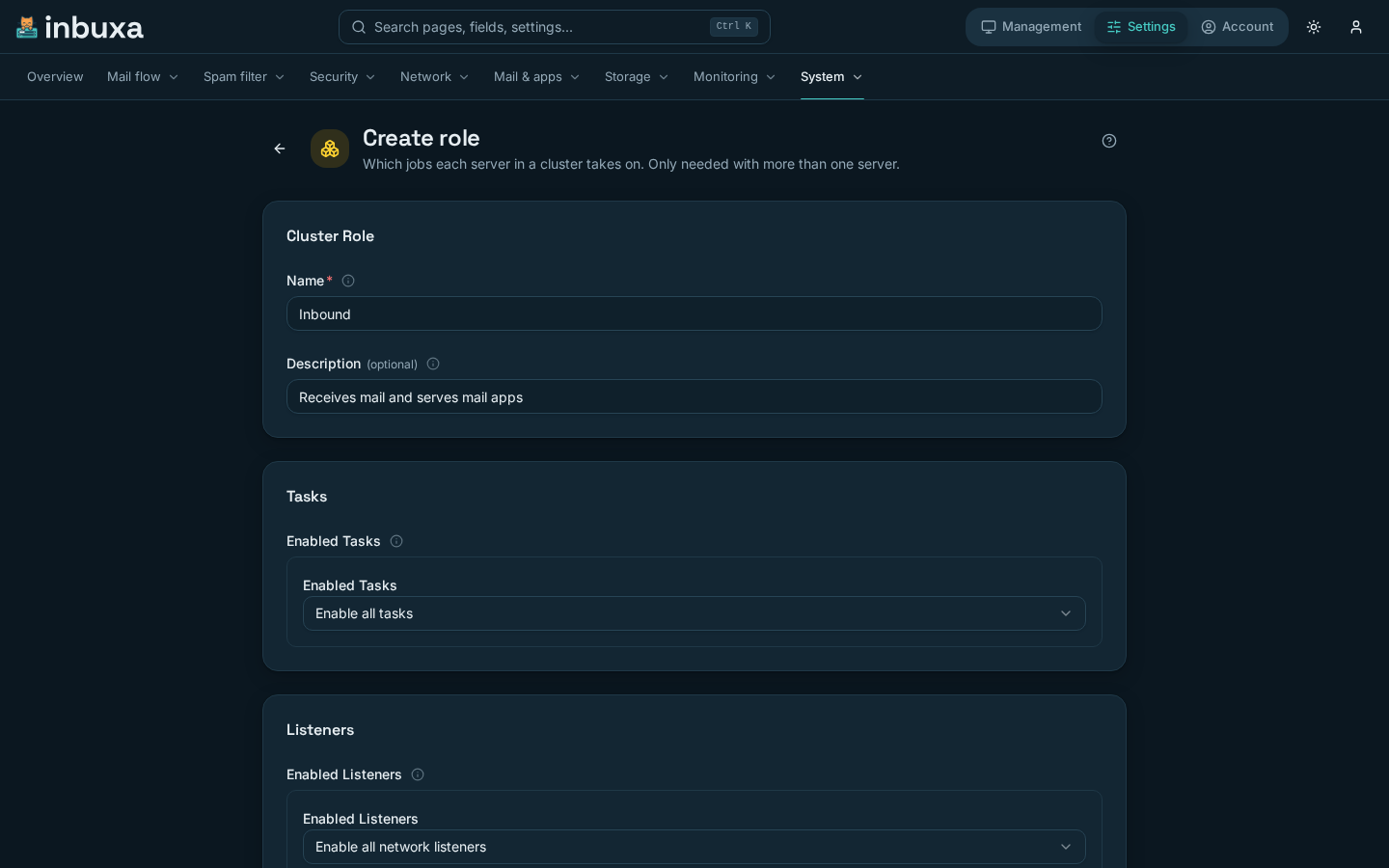
A role narrows that down. Roles are under Settings › System › Roles:
| Field | What it is |
|---|---|
| Name | What the node asks for, with INBUXA_ROLE |
| Enabled Tasks | Enable all tasks, Disable all tasks, or enable or disable some |
| Enabled Listeners | Enable all network listeners, Disable all network listeners, or enable or disable some |
A node takes a role from the environment variable INBUXA_ROLE, set to the
role's name. A name that doesn't match a role is an error at startup, rather
than a node quietly doing everything.
The tasks
| Task | What goes with it |
|---|---|
| Outbound Email MTA | Delivering outgoing mail. Also building and sending DMARC and TLS reports |
| Task Queue Processing | Background jobs, including ACME renewals, DKIM rotation, DNS updates, calendar jobs and restoring archived items |
| Task Scheduling | Deciding when scheduled jobs are due |
| Spam Classifier Training | Retraining the spam classifier from what people mark |
| Search Indexing | Indexing new mail for search |
| Push Notifications | Telling clients about changes |
| Store Maintenance, Account Maintenance | Housekeeping on the store and accounts |
| Calculate Metrics, Push Metrics | The numbers behind the dashboards |
A node without Outbound Email MTA still records the DMARC and TLS results for mail it receives. Reports then cover mail that arrived on any node, and only building and sending them stays with nodes that deliver.
A common split
One arrangement: every node receives mail and serves clients, and one node also does the jobs that should happen once. Give the other nodes a role that disables Task Scheduling, Spam Classifier Training and the two metrics tasks, and leave the node that runs them without a role.
A node that should receive mail but never send it also disables Outbound Email MTA. Its outgoing mail is then delivered by the nodes that keep it.
Changing a role
- Tasks change at once. Taking a task away from a role stops it on those nodes, and work already running finishes first.
- Listeners, and moving a node to a different role with
INBUXA_ROLE, take effect when the node restarts.
When a node stops
Each node renews a lease once a minute. The console's Management › Cluster lists the nodes with the time of their last renewal and a status:
| Status | Means |
|---|---|
| Active | Heard from recently |
| Stale | Silent for three minutes |
| Inactive | Silent for a day. An old lease, not a member |
What happens to a stopped node's work:
- Stopped cleanly, as in a restart, it hands its claimed tasks back, and another node picks them up straight away.
- Killed or cut off, its task claims run out, and another node takes them over within about five minutes.
- A database that hangs fails requests after a limit instead of holding them forever, so a node can recover when the database does.
Mail waiting in the queue is in the shared store, so another node with Outbound Email MTA delivers it.
Watching it
The dashboard
When more than one node holds a lease, the console's dashboard shows it everywhere: a chip in the top band says how many nodes are up (3/3 nodes), the command center has a Nodes up dial, and a node that stops renewing its lease becomes a Needs attention tile naming it.
The dashboard's Cluster page has the detail: how many nodes are up, the oldest heartbeat (nodes renew every minute, and count as silent after three), how much of the period the links between nodes and the data layer ran clean, a live list of nodes, and error trends. It links to Management › Cluster.
Health checks for load balancers
Every node answers three unauthenticated checks over HTTP:
| Path | Answers 200 when | Use it for |
|---|---|---|
/healthz/live |
The process is up | Restarting a node that has hung |
/healthz/ready |
The data store answers, too | Taking a node out of a load balancer while its store is unreachable |
/healthz/cluster |
The coordinator is connected, or there is none | Monitoring. It reports {"coordinator": "connected"} or "disconnected" |
The coordinator is kept out of live and ready on purpose. A node without its coordinator still serves mail, and failing those checks would have an orchestrator restart, or take out of service, every node at once when the coordinator goes down.
Storage that grows with the cluster
Two settings spread storage load over more machines. Both are off unless you set them.
- Read replicas: a PostgreSQL or MySQL data store can list Read replicas. Reads of account data go to them, and writes and anything that must be current go to the primary. Someone who has just changed something reads it back from the primary, so they never see their change undone.
- Sharded stores: the blob store and the in-memory store can each be Sharded, spreading data across several stores of the same kind. Keep the list of shards stable once it holds data: changing it moves where each item is looked for.
See Monitoring for metrics, logs and alerts, which work the same way on one node or many.