Locked accounts
A locked account keeps receiving mail, but nobody can sign in to it, and it sends nothing on its own. You can hand it to one or more delegates, who open it next to their own mail, at an access level you choose.
It's for when the mailbox has to keep working without its owner:
- Someone leaves. Password resets for services they looked after, customers and invoices still arrive. Their manager reads them and answers.
- An investigation. Someone reviews the mailbox while the owner can't change anything in it.
- A compromised account. Shut it out at once, while someone checks what was sent from it.
Lock and unlock in whichever place you're already in:
- Management › Directory › Accounts: each person's ⋯ menu ends with Lock this account…, or Unlock… if they're locked, and a locked account shows a Locked badge beside its address.
- A person's own page shows whether they're locked, with the same two actions.
- Management › Compliance › Locked accounts lists every locked account with its delegates, and is where delegates are changed.
What a lock does
Nobody can sign in, on any protocol, with any credential: password, app password, API key, or an OAuth token issued before the lock. The refusal looks exactly like a wrong password, so someone who knows the right one learns nothing from it. Apps holding a refresh token get no new access.
Open sessions end on every server in a cluster: webmail, JMAP push, and IMAP, which is refused from its next command.
POP3 and ManageSieve sessions already open
A POP3 or ManageSieve session that was already signed in keeps working until it disconnects, since neither protocol checks again once signed in. Both are usually short. If you need them cut at once, switch the legacy protocols off for the account's tenant or the server.
Mail keeps arriving. It's delivered, filed by the account's own filters, and counted against its quota as before.
Nothing goes out on its own. While the account is locked:
- forwarding and redirect filters send nothing;
- no vacation reply is sent;
- a filter that would reject a message keeps it instead;
- no read receipt is sent.
There's no option to keep any of these running. Senders see exactly what they saw before the lock: their mail is delivered, with no bounce and no reply. Nobody outside learns from the mailbox that anything has changed. The only mail that leaves is what a delegate with send as deliberately sends.
Filters that only file, flag or discard mail keep running.
Delegates
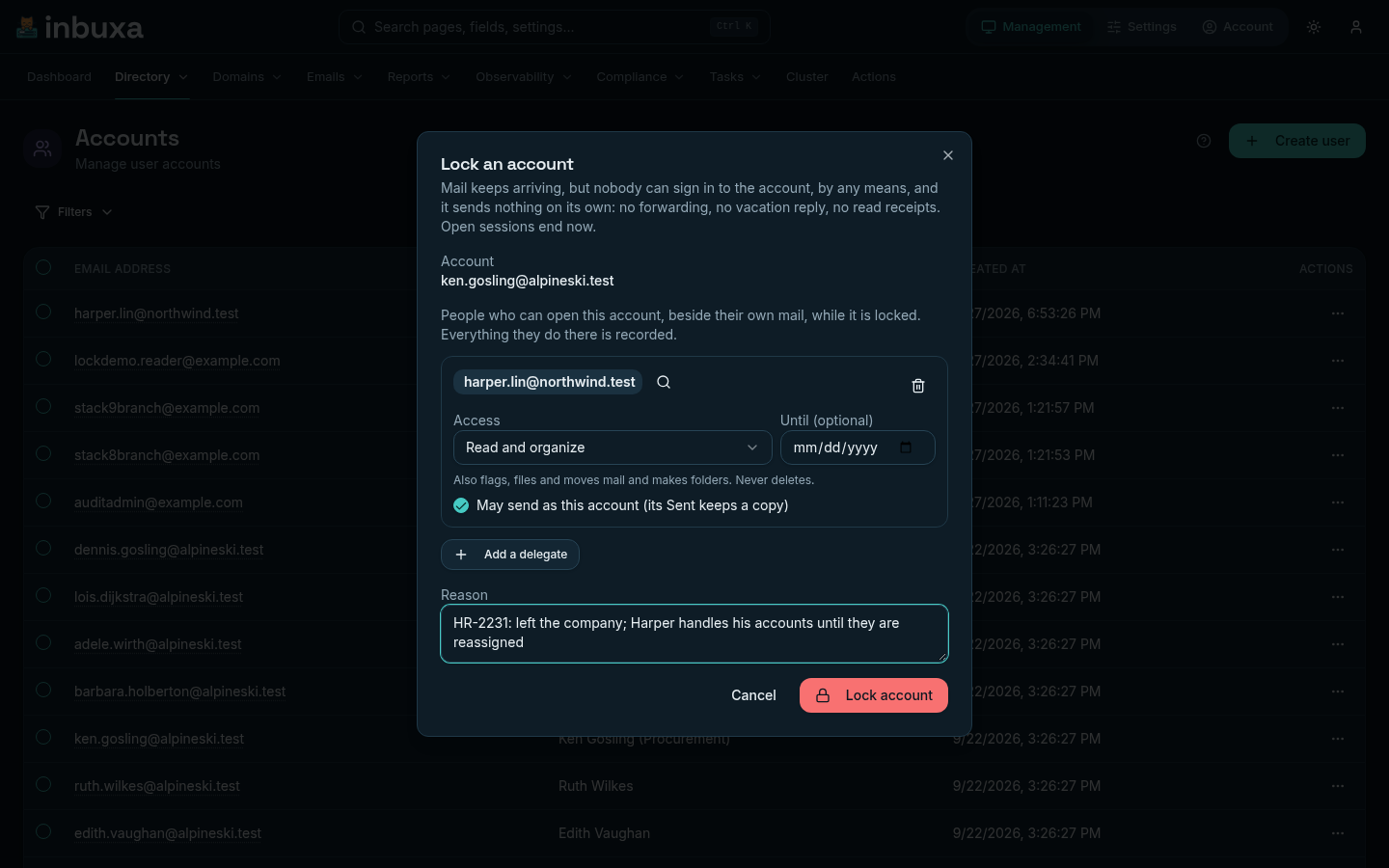
Each lock can be handed to up to ten people. A delegate has to be a person's account, not a group, and can't be the locked account itself. A tenant administrator can choose delegates only from its own tenant.
| Access | A delegate can |
|---|---|
| Read only | See and download everything, and change nothing. Reading doesn't even mark mail as read. |
| Read and organize | Also flag mail, file and move it, and make folders; add and change events, contacts and files. Never delete. Trash and Junk stay read-only, since mail there is deleted in time. |
| Full | Everything the owner could do, deleting included. |
Send as lets a delegate with Read and organize or Full send from the locked account's addresses. The message is signed as that account, and a copy is kept in its Sent, not the delegate's.
Until is optional: at the end of that day, in the time zone of whoever set it, the delegation ends on its own, and the lock stays. The delegate loses the account everywhere, and any sharing they had with it before the lock is put back.
Change a lock's delegates with Delegates… on the list.
What delegates see
In inbuxa Webmail, the account menu gains Mail to show, listing the locked accounts they've been handed. Choosing one needs no new sign-in. While it's open:
- a red bar across the top names the account and the access level, with Back to my mail at its end;
- the inbuxa wordmark turns red, with a padlock beside it;
- the browser tab's title starts with a padlock.
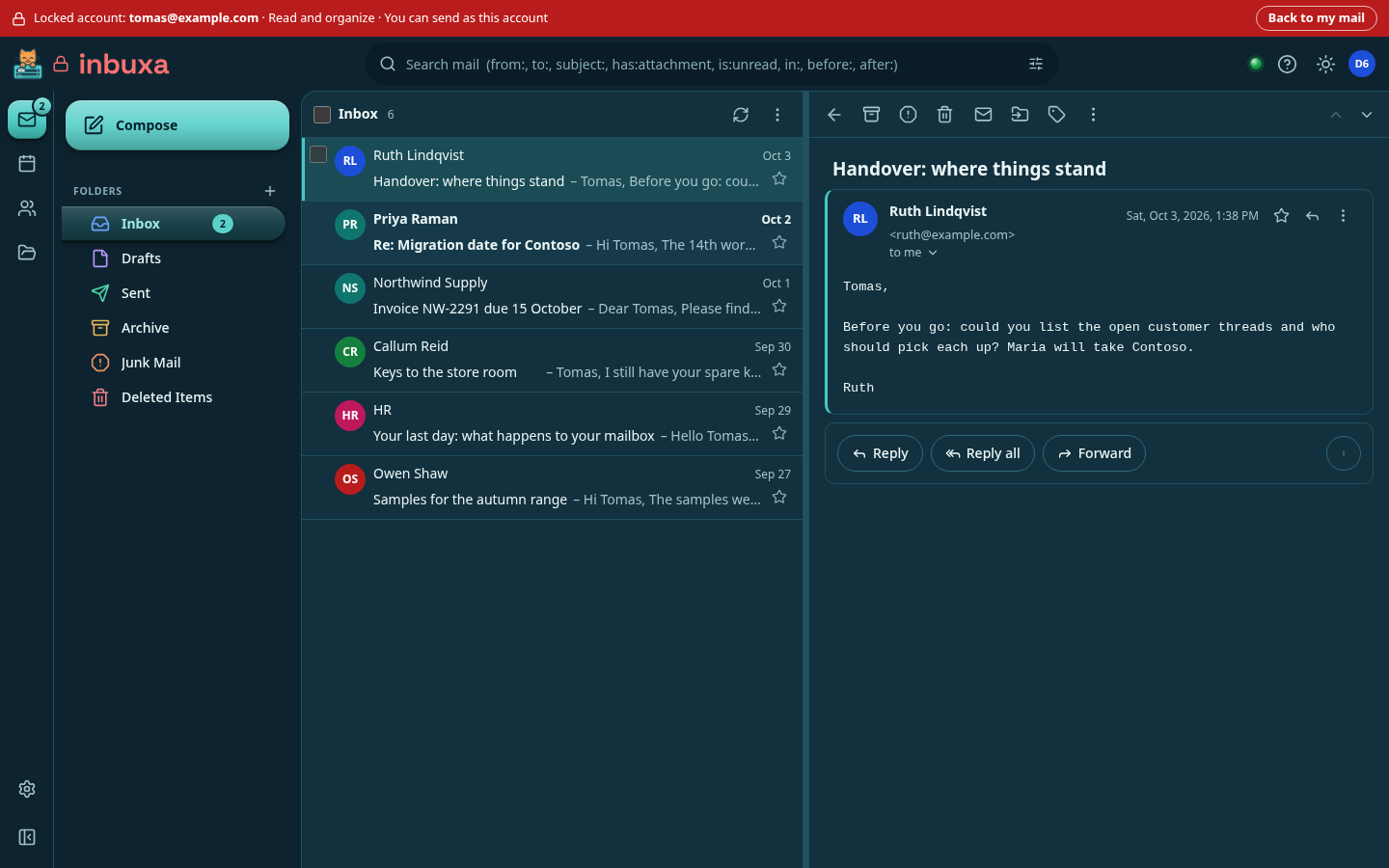
Its mail, calendar, contacts and files all switch. Their own settings stay theirs, and notifications for their own new mail keep coming. The menu entry appears only for someone who has been handed an account, so nobody else sees anything new.
Other apps see the locked account's folders as shared with the delegate: IMAP apps under shared folders, calendar and contact apps as shared calendars and address books, and JMAP apps as another account. IMAP needs legacy protocols on for the delegate.
What is recorded
Locking, unlocking and changing delegates each require a reason: a ticket, a case, "left the company". Each goes into the audit log with the reason and who did it.
What delegates do in the locked account is recorded too: their access, once an hour, and every change they make, with whether it worked.
Who can lock
The Administrator and Tenant Administrator roles can lock, change delegates and unlock, since offboarding is a tenant administrator's everyday work. A tenant administrator reaches only its own tenant's accounts. Nobody can lock their own account.
Compliance officers can see locked accounts and their delegates, their own tenant's for a tenant's officer, but not lock, change or unlock them.
A custom role, under Management › Directory › Roles, can be given any of the four separately: See locked accounts and their delegates, Lock accounts, Change a locked account's delegates and Unlock accounts.
Unlocking
Unlock… asks for a reason. Then:
- the account can sign in again, and its forwarding and vacation reply resume;
- delegates lose it, and any sharing they had with the account before the lock is put back as it was.
The password doesn't change
Unlocking leaves the password as it was. If someone else may know it (a former employee, or whoever compromised the account), set a new one on the account's page as well.
Directories and SCIM
The lock is inbuxa's own, checked after the directory has accepted the
password. An account signing in through LDAP, Active Directory, SQL or
OpenID Connect stays locked however valid its directory password or token,
and nothing the directory or SCIM sends lifts it: not an enabled flag, not a
role, not active: true. Disabling the person in the directory as well is
good practice, but not required.
A delegate can be a directory account. Their access comes from the delegation, not from the directory.
A lock doesn't preserve evidence
A lock stops the owner, not the delegates: a delegate with Full access can delete mail. If the mailbox may be needed as evidence, place a legal hold on it as well: then nothing deleted from it is ever lost, by anyone.